Paperless-ngx hosted: self-host it, have it hosted, or switch to a managed service
In short. Paperless-ngx is an excellent open-source document manager, but you have to install it, update it, back it up and make it reachable. Three ways to drop some of that work: a rented server, a host that runs the instance for you, or a service built on paperless-ngx such as Charti, which adds Swiss QR bills, classification and a summary of every document by an AI hosted in Switzerland, and a copy of every document in your own cloud.
If you are reading this, you probably know paperless-ngx, and maybe you already run it on a NAS or a mini PC. And maybe you have also spent a Sunday fixing an upgrade, setting up mail fetching, or wondering whether your backups actually work.
Paperless-ngx in a nutshell
Paperless-ngx turns your paper and PDF documents into a searchable archive: OCR, full-text search, tags, correspondents, document types, storage paths, matching rules, mail fetching, a web interface and an API. It is free software, under the GPL-3.0 licence, maintained by a community team.
It descends from Paperless, started by Daniel Quinn, then from Paperless-ng, by Jonas Winkler. When Paperless-ng development stalled, the community picked it up in 2022 as Paperless-ngx, which now describes itself as the official successor. Version 3.0 added optional AI features, off by default.
What self-hosting really costs
The software is free; your time is not. A self-hosted instance needs:
- Upgrades. Following releases, reading the migration notes, updating the containers, and checking that everything comes back up. A major version asks for more.
- Backups. The database and the files, off the machine, and a restore you have tested at least once. A backup you have never restored is not a backup.
- Remote access. A reverse proxy and a TLS certificate, or a VPN, if you want your documents away from home without exposing your network.
- Mail intake. A dedicated mailbox, app passwords, mail rules to maintain.
- OCR and classification. The right OCR languages, and a classifier that only gets good after hundreds of hand-corrected documents.
- Hardware. Enough memory for OCR and training, and a disk that won’t die silently.
For many people that is the fun part: you learn, you control everything. But if your household paperwork depends on a server you no longer want to look after, it is time to look at the alternatives.
Your options for a hosted paperless-ngx
| Option | What you manage | For whom |
|---|---|---|
| At home (NAS, mini PC) | Everything: hardware, upgrades, backups, access | People who enjoy it |
| Rented server (VPS) | Everything but the hardware, plus the security of an exposed server | People who want access from anywhere |
| Managed paperless-ngx hosting | The paperless-ngx configuration; the host runs the instance | People who want paperless-ngx as it is |
| A service built on paperless-ngx (Charti) | Nothing: you use the service | People who want the result, plus Swiss QR bills |
For managed hosting, check where the data lives (country, jurisdiction), how backups work, and how you get your documents back if you leave.
Charti: the lineage, explained
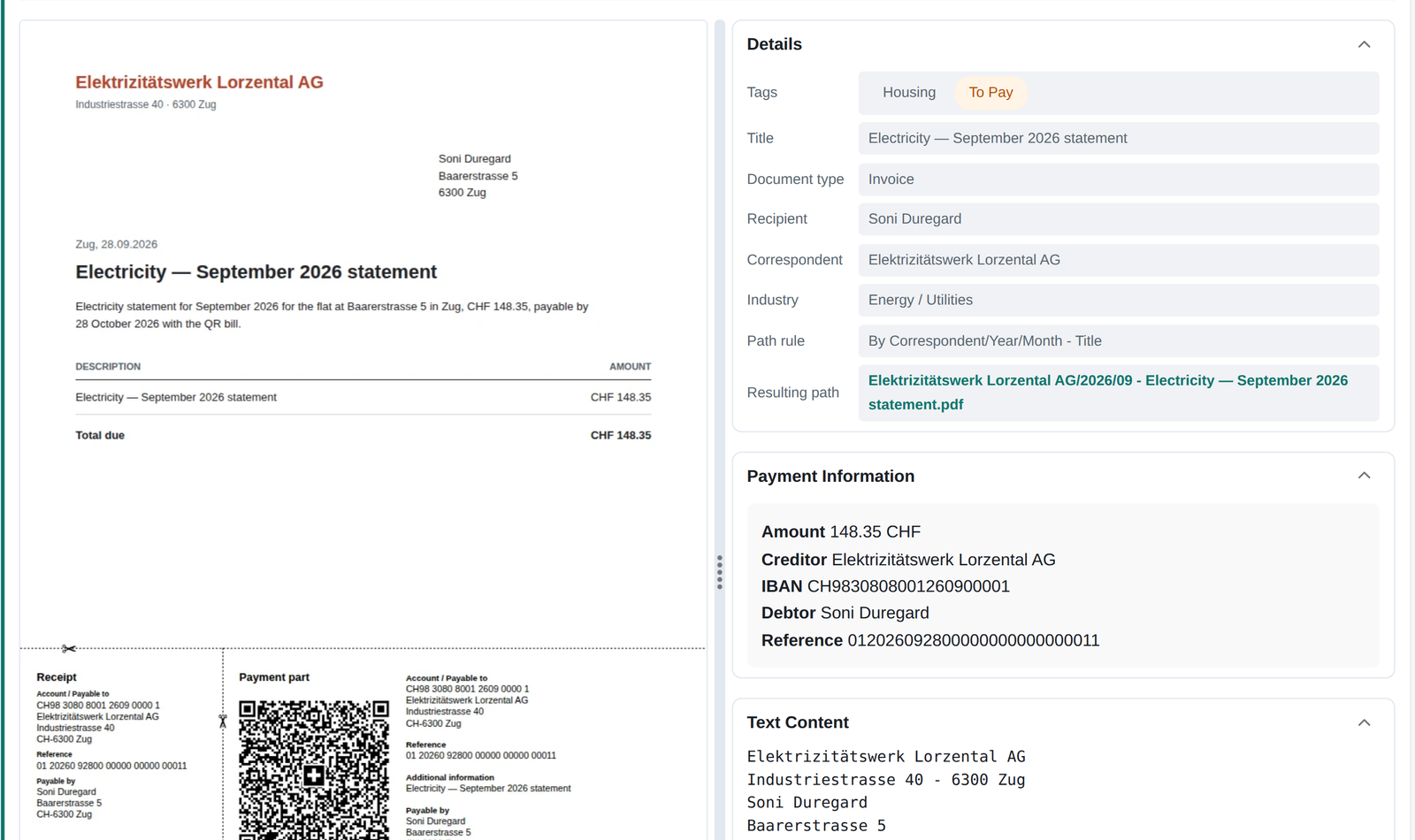
Charti is built on paperless-ngx: we use it as the engine, as a dependency rather than a fork, for OCR, storage, search and the document model (correspondents, types, tags). Everything specific to Charti is a layer on top. Charti is made for Switzerland: Swiss QR bills, Swiss issuers, hosting in Switzerland, and an interface in English, French, German and Italian.
| Self-hosted paperless-ngx | Charti | |
|---|---|---|
| Installation, upgrades, backups | You | Us |
| Mail intake | IMAP rules on your own mailbox | A personal @charti.ch address; an unknown sender is held until you approve it |
| Classification | Matching rules and a local model to train; optional AI since 3.0, to configure | AI hosted in Switzerland that keeps nothing, plus a catalogue of Swiss issuers, no training |
| Summaries | None: the 3.0 AI suggests how to file a document and answers your questions, but does not summarise each document | A short summary of every document in your language, even for a letter in German, French or Italian |
| Corrections | The model slowly relearns | A correction is remembered for the next document from the same issuer |
| Swiss QR bills | No | Read automatically, tagged “to pay”, gathered in an eBanking view |
| OCR errors | Left as they are | Detected and corrected automatically |
| Where the data lives | At your place | In Switzerland, plus a copy in your own cloud |
| Exit | Your files are already at home | Your files are already at home: kDrive, Google Drive, Dropbox, OneDrive or WebDAV (Nextcloud, NAS) |
| Price | Free, plus your hardware and your time | CHF 9.90 a month or CHF 99 a year, 50 documents a month included |
The exit path is built in, not promised. Every validated document is copied to your own cloud, in ordinary folders, then to your computer. You can even delete your documents from Charti once the copy has arrived: it is never touched.
What you give up by switching to Charti
To be fair: a managed service is not an instance of your own.
- No server access: no plugins, no custom scripts, no fine-grained paperless-ngx configuration.
- The interface is Charti’s, not paperless-ngx’s.
- It is not free, and every imported document counts towards your quota.
If you enjoy running your instance, keep it: paperless-ngx deserves it. If what you mostly want is bills that file and pay themselves, with your files always at home, Charti is made for you.
Frequently asked questions
Is there a hosted version of paperless-ngx?
The project publishes the software, under the GPL-3.0 licence, and a public demo, but installing it is up to you. If you don’t want to run it yourself, you can hand it to a host for open-source applications, or pick a service built on paperless-ngx, such as Charti.
Is Charti a fork of paperless-ngx?
No. Charti uses paperless-ngx as its engine, as a dependency rather than a modified copy of its code: OCR, storage, search and the document model. Charti adds its own layer on top: the interface, e-mail intake, AI classification and a summary of every document, Swiss QR bills and sync to your own cloud.
Does paperless-ngx use AI?
Its built-in suggestions (tags, correspondents, document types) come from a local machine-learning model trained on your documents. Since version 3.0 there are also features based on a large language model, off by default: you configure the model yourself, local or remote.
Can I import my paperless-ngx documents into Charti?
Yes, by uploading the files, including as a ZIP archive, which is extracted automatically. paperless-ngx’s document_exporter command exports your originals. Every document counts towards your quota: 50 documents a month are included, and packs of 100 documents are available to buy.
Where are my documents with Charti?
In Switzerland, for both storage and processing, AI classification and summaries included, which run at Infomaniak with no content retained. And a copy of every filed document lands in your own cloud (kDrive, Google Drive, Dropbox, OneDrive or a WebDAV server such as Nextcloud), then on your computer.
This guide is for information only and is not legal or tax advice. If in doubt, ask your cantonal tax office or your fiduciary.