Fake QR bills: how to spot the scam, and what to do if you have paid
In short. A fake bill looks like a real one: copied logo, plausible amount, valid QR code. What gives it away is almost always the payee: a name or an IBAN that does not match the company. Before approving a payment, compare what your banking app shows with the same biller’s previous bills. If you have already paid, call your bank straight away, then file a complaint.
The QR code has made paying bills very simple: you scan, you approve. That is also what makes fake bills effective. Your banking app checks that the QR code is well formed, not that the bill is honest.
The 5 most common scams
1. The fake bill from a real company. It copies the logo and layout of a known supplier (telecoms, insurer, energy), but the QR code contains the fraudster’s IBAN. It often arrives by e-mail, sometimes by post.
2. The changed IBAN. An e-mail, apparently from your usual supplier, announces that “our bank details have changed” and attaches a corrected invoice. A scam aimed mainly at the self-employed and SMEs.
3. The directory or register you never ordered. A form “to check” or an invoice for a listing in a business directory, imitating an official procedure. Sending invoices for a directory entry or an advertisement without having been commissioned is an unfair practice (art. 3 para. 1 let. q UCA). An offer for a listing must, moreover, clearly state that it is paid, its duration and its total price (art. 3 para. 1 let. p UCA).
4. The fake reminder or threat of debt collection. “Final reminder before debt collection” for a debt you do not recognise, with fees to pay immediately. Real debt collection goes through the debt collection office (office des poursuites, Betreibungsamt), with a payment order properly served on you.
5. The booby-trapped QR code. A QR code without a Swiss cross, on a letter, a parking notice or a sticker, that opens a site imitating your bank. The QR code of a real QR bill contains payment data: it never sends you to a site where you enter your banking login.
The warning signs
| Sign | Why it is suspicious |
|---|---|
| A bill you were not expecting | No order, no subscription, no service received |
| The payee’s name does not match | The banking app shows the real account holder, not the logo on the bill |
| The IBAN differs from previous bills | The most reliable sign of fraud |
| A pushy tone, a threat | “Final deadline”, “immediate debt collection”, “account blocked” |
| An unusual sender | An e-mail address imitating the company’s, one letter off |
| A QR code without a Swiss cross | It is not a Swiss payment QR code |
Check before paying: 3 habits
- Read the payee and the IBAN that your banking app shows when you approve, not those printed on the bill. Compare them with a previous bill from the same biller.
- If in doubt, call the company on a number you already know (official website, contract, old bill), never the one on the suspect bill.
- Always scan from your banking app, never with the camera. Step by step: Scanning a QR bill.
You have paid: what to do
- Call your bank immediately. Depending on the timing, it may try to block or recall the payment. There is no guarantee, but every hour counts.
- Keep all the evidence: the bill, the e-mail with its sender, the payment statement.
- File a complaint with the police.
- Report the case to the Federal Office for Cybersecurity (FOCS), through its online reporting form: it helps the office warn the public about new scams.
- Warn the company that was imitated, which can alert its other customers.
If you entered your banking login on a site opened from a QR code, call your bank to block access and change your passwords.
Fewer fake bills, from the moment they arrive
With Charti, your bills arrive by a single route, and that route is filtered:
- Only trusted senders. An e-mail from an unknown sender is held until you approve it, once. A stranger cannot slip a fake bill in among yours (see collection).
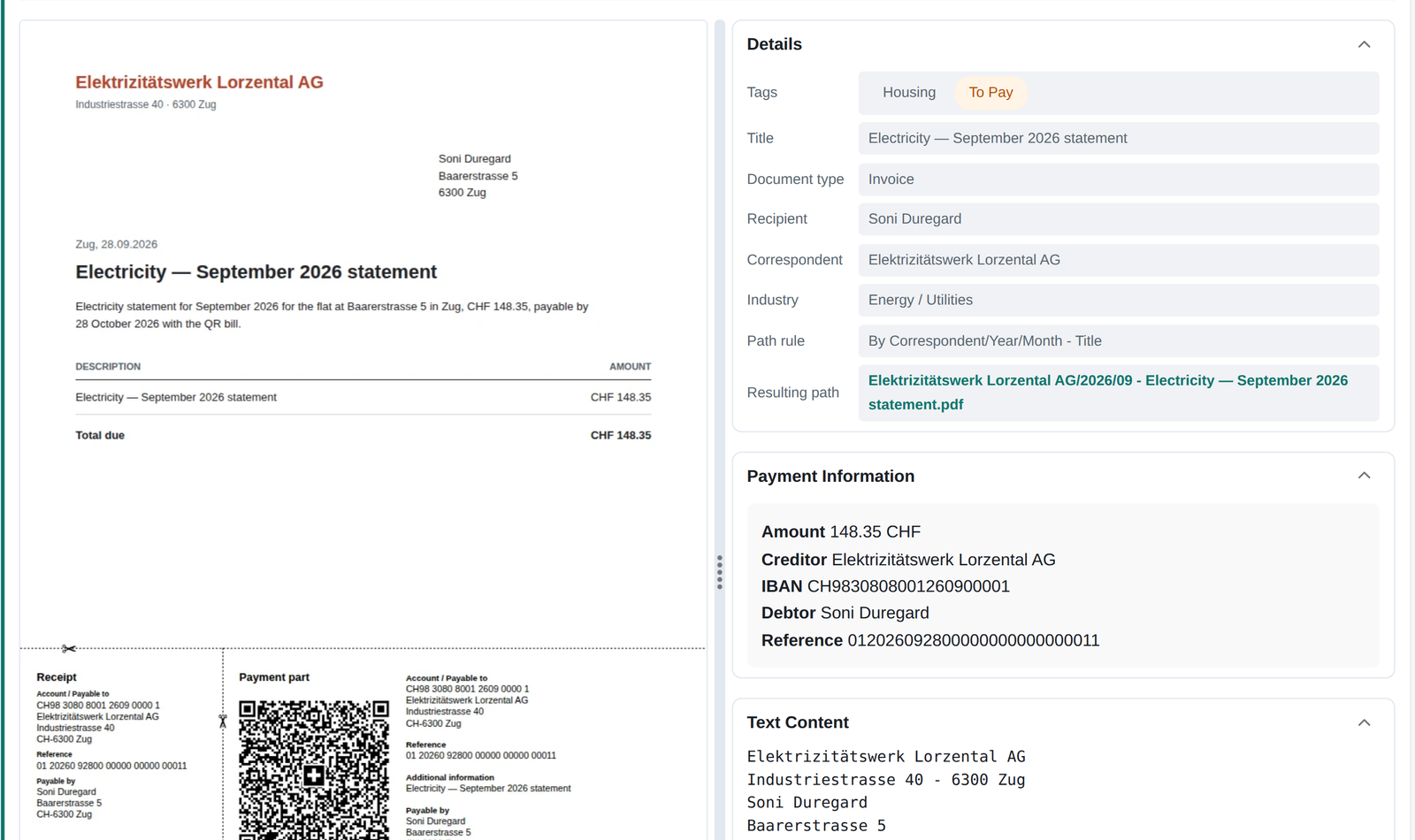
- The payee and IBAN are shown, read from each bill’s QR code. Earlier bills from the same issuer are one click away, to compare.
- Reminders get their own tag: a reminder for a bill you never received stands out.
Frequently asked questions
How can I spot a fake QR bill?
Compare the payee’s name and the IBAN that your banking app shows with those on the same company’s previous bills. Be wary of an unexpected bill, a changed IBAN, a pushy tone or a threat of debt collection for a debt you do not recognise.
Can a QR bill contain a dangerous link?
The QR code of a QR bill, marked with a Swiss cross, contains payment data, not a website to open. A QR code without a Swiss cross that opens a website is not a bill: do not scan it, and never enter your banking login on a site opened from a QR code.
I paid a fake bill: what should I do?
Call your bank immediately: depending on the timing, it may try to block or recall the payment, with no guarantee. Then file a complaint with the police, keep all the evidence (bill, e-mail, statement), and report the case to the Federal Office for Cybersecurity.
Do I have to pay an invoice for a directory listing I never ordered?
No. Sending invoices for a directory entry or an advertisement without having been commissioned is an unfair practice (art. 3 para. 1 let. q Unfair Competition Act, UCA). Do not pay, and keep the document.
Where can I report a fake bill in Switzerland?
To the police, by filing a complaint, if you have suffered a loss. And to the Federal Office for Cybersecurity (FOCS), through its online reporting form, to help it warn the public.
This guide is for information only and is not legal or tax advice. If in doubt, ask your cantonal tax office or your fiduciary.