How to pay a Swiss QR bill: a guide for newcomers
In short. The QR bill is the standard bill in Switzerland. Its Swiss QR code (a QR code with a Swiss cross in the middle) holds everything needed to pay: payee, account, amount and reference. To pay, open your Swiss banking app, choose Scan, and point it at the code: the payment fills itself in. Pay by the due date: unpaid bills lead to reminders, then to debt collection, which landlords check when you apply for a flat.
If you have just moved to Switzerland, the first QR bill usually arrives within weeks: health insurance, the Serafe radio and TV licence, electricity, your mobile plan. Here is everything you need to pay it, and to keep on top of the next ones.
What a QR bill looks like
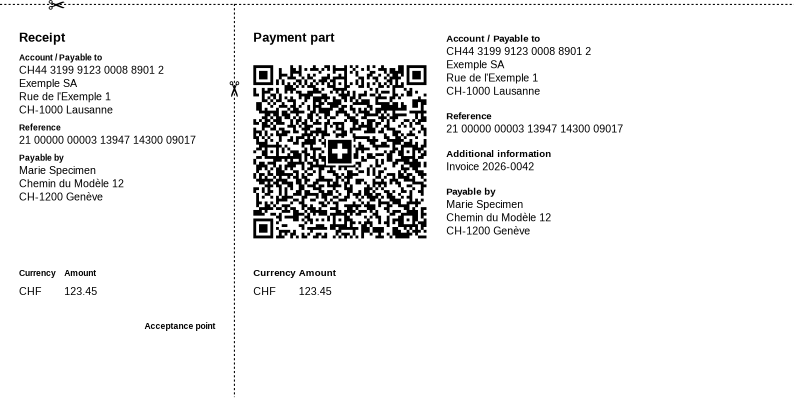
A QR bill is an ordinary bill with a payment part at the bottom, separated from the rest by a dotted line (a perforation on paper, a line with a scissors symbol on a PDF):
- on the left, the receipt, the part you keep if you pay at a post office;
- on the right, the payment part, with the Swiss QR code: a square QR code with a Swiss cross in the middle.
The Swiss cross is what makes it a Swiss payment code. A QR code without it is not a QR bill.
The labels, in German, French and Italian
Your bills will be in the language of your canton, or of the company. The payment part always has the same fields:
| English | German | French | Italian |
|---|---|---|---|
| Payment part | Zahlteil | Section paiement | Sezione pagamento |
| Receipt | Empfangsschein | Récépissé | Ricevuta |
| Account / Payable to | Konto / Zahlbar an | Compte / Payable à | Conto / Pagabile a |
| Reference | Referenz | Référence | Riferimento |
| Additional information | Zusätzliche Informationen | Informations supplémentaires | Informazioni supplementari |
| Payable by | Zahlbar durch | Payable par | Pagabile da |
| Currency / Amount | Währung / Betrag | Monnaie / Montant | Valuta / Importo |
Two more words worth knowing: a reminder is a Mahnung (German), a rappel (French) or a richiamo or sollecito (Italian); debt collection is Betreibung, poursuite or esecuzione.
How to pay
With your banking app (the easiest)
Open your Swiss bank’s app, or the PostFinance app, go to payments and choose Scan (or the camera icon). Point it at the QR code. The payee, amount and reference fill in by themselves. Check them, pick the execution date (the due date, so the money stays in your account until then), and confirm.
Bill received as a PDF? Open it on your computer and scan the screen with your phone. Many banking apps can also import a PDF or a screenshot directly.
In e-banking on a computer
Most Swiss e-banking platforms accept a QR bill by uploading the PDF or a photo, or with a USB QR reader.
With TWINT
Since 4 November 2026, the TWINT app can pay QR bills, but only from billers that have enabled it (look for the TWINT logo). You choose when to pay, within the payment deadline.
In cash, at a post office
You can pay in cash at a post office counter, with the printed bill, payment part included. Fees may apply.
From a foreign bank account
No Swiss account yet? You can usually pay by international transfer:
- enter the IBAN from the “Account / Payable to” field, with the payee’s name and address;
- enter the amount and currency shown on the bill (CHF or EUR);
- copy the reference into the payment reference or remittance information field.
Your bank may charge fees and convert the currency at its own rate. If your bank has no field for a Swiss QR reference, ask the biller how to identify your payment. Once you have a Swiss account, use it: it is simpler and usually free.
Pay on time: reminders and debt collection
Swiss bills usually give you 30 days to pay; the due date is on the bill. If you miss it, you will get a reminder, sometimes with a fee set in the biller’s terms.
If a bill stays unpaid, the creditor can start debt collection proceedings: the debt collection office serves you a payment order (Zahlungsbefehl, commandement de payer, precetto esecutivo). It comes with short deadlines: read it as soon as it arrives, and ask the debt collection office or a legal advice service what to do.
This matters more than it seems: proceedings appear in the debt collection register, and Swiss landlords ask for an extract of it when you apply for a flat. A forgotten CHF 50 bill can cost you an apartment.
eBill: bills straight into your e-banking
Once you have a Swiss bank account, activate eBill in your e-banking. Billers that offer it (health insurers, utilities, telecoms) then send their bills directly to your e-banking, where you approve them with one click, without scanning anything. For the others, the QR bill stays the rule.
An eBill also stays in your e-banking: to keep it, you still have to download its PDF, because it is deleted about two years after the due date. To file those PDFs on your computer, see Keep every bill in one place below.
Three common mistakes
- Paying twice. The paper bill arrived, then the PDF by e-mail, then a reminder. Mark each bill as paid as soon as you pay it.
- Changing the reference. The biller uses it to match your payment. A wrong reference can trigger a reminder.
- Not checking the payee. Fake bills exist. Before confirming, read the name and IBAN your banking app shows: they must match the company that billed you.
Keep every bill in one place, in English
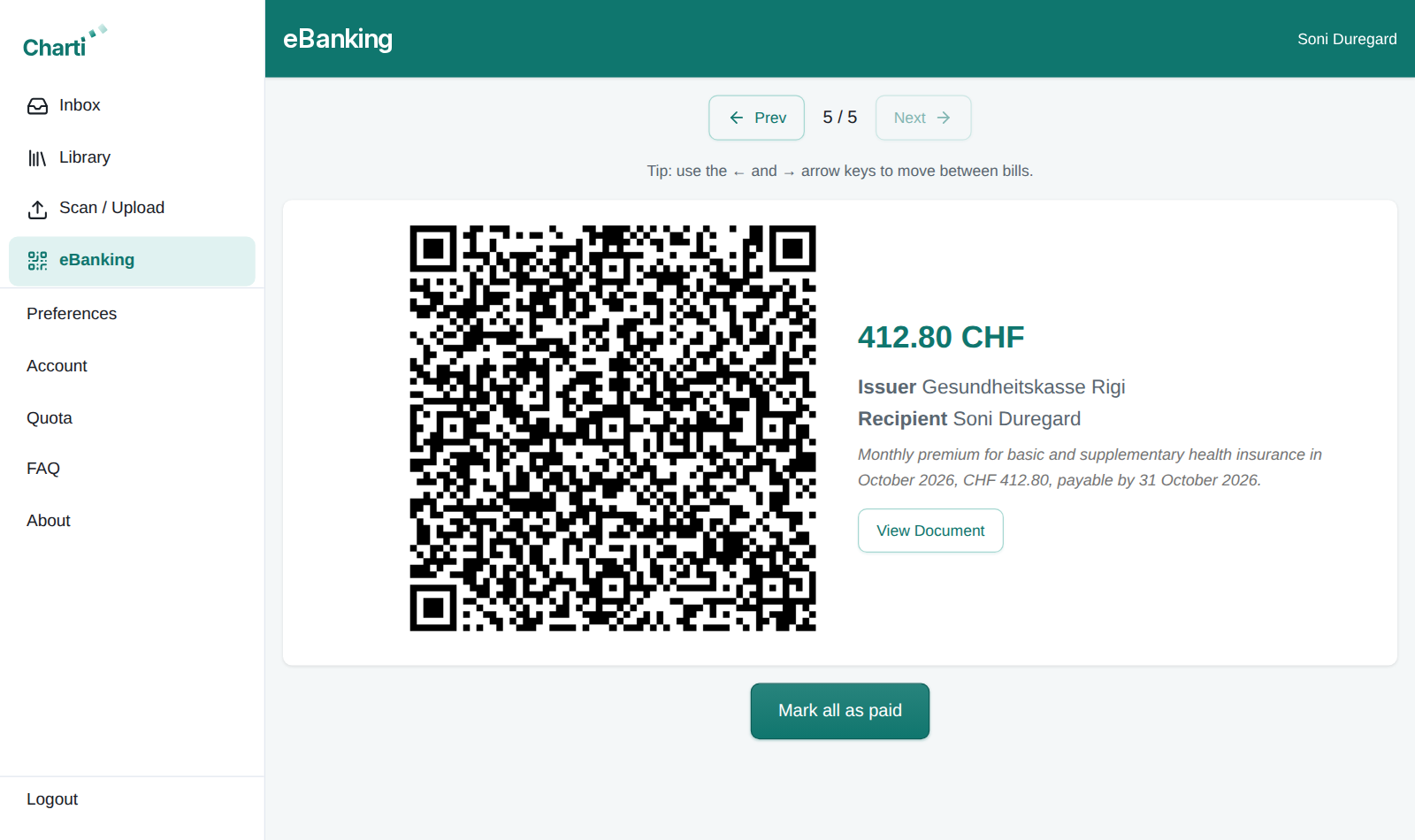
Bills arrive by post, by e-mail and in customer portals, in three languages. With Charti, you forward them to your personal @charti.ch address. Charti reads each one, in German, French or Italian, summarises it in the language you choose, tags the QR bills as “to pay” and gathers them in an eBanking view, where you scan them one after the other with your banking app. Reminders that Charti recognises get their own tag to help them stand out; open your post as soon as it arrives all the same.
Frequently asked questions
Do I need a special app to scan a Swiss QR bill?
No. Use your Swiss bank’s app or the PostFinance app: in the payments section, choose the scan option and point the camera at the QR code. Since November 2026, some QR bills can also be paid with TWINT, if the biller has enabled it.
Can I pay a Swiss QR bill from a foreign bank account?
Usually yes, by international transfer: enter the IBAN, the payee’s name and address, the amount and currency, and copy the reference into the payment reference or remittance field. Your bank may charge fees and convert the currency. If in doubt, ask the biller how to reference your payment.
Can I pay a QR bill in cash?
Yes, at a post office counter, with the printed bill including its payment part. Fees may apply.
What happens if I pay a bill late in Switzerland?
You will usually get a reminder, sometimes with a fee. If you still do not pay, the creditor can start debt collection proceedings, which show up in the debt collection register: landlords ask for an extract of that register when you apply for a flat.
What is the reference number on a QR bill for?
It lets the biller match your payment to the bill automatically. Never change it or reuse one from an older bill, or your payment may not be recognised and you may get a reminder.
This guide is for information only and is not legal or tax advice. If in doubt, ask your cantonal tax office or your fiduciary.