Paying several QR bills at once: how to settle everything in one session
In short. There is no “pay everything” button for QR bills: each QR code is one payment. But by gathering all the month’s bills in one place, scanning them in a row with each one’s due date, then approving all the orders at once, a single session a month is enough.
Every month it is the same thing: the health insurer, electricity, phone, the dentist, tax instalments, the gym subscription. One bill by post, another as a PDF by e-mail, a third in a customer portal. And you end up opening the banking app ten times a month, at the risk of forgetting one.
The answer is not to pay faster, but to pay less often: once a month, all in one go.
The method in 4 steps
1. Gather everything in one place
This is the step that saves the most time. As long as bills are scattered (letterbox, e-mails, portals), you pay as you go because you are afraid of forgetting.
- For paper, a single “to pay” tray, near the door.
- For e-mails, a “to pay” folder in your mailbox, where you move each bill as soon as it arrives.
- For portals (health insurer, provider), ask for bills to be sent by e-mail where possible: they then join the folder.
2. Pick a fixed day in the month
For example the 25th, just after payday. On that day, you pay everything that has arrived since the last time. With payment terms of 30 days, as a rule, one session a month is enough to settle everything on time. Bills with a short due date, such as reminders, are easier to spot when you gather everything.
3. Scan in a row, with the right execution date
Open your banking app and scan the QR codes one after the other. For each, choose the bill’s due date as the execution date: your bank will pay at the right time, and the money stays in your account until then.
For bills received as PDFs, open them on your computer and scan the screen with your phone. If the scan will not work, our guide Scanning a QR bill has the fixes; and to understand the QR bill in full, see How to pay a Swiss QR bill: a guide for newcomers
4. Approve all the orders at once, then mark as paid
Most e-bankings gather the orders you have entered in a list of pending orders, which you check and then approve in one go. Afterwards, mark the bills as paid: a stamp, a “paid” folder, whatever, as long as it is clear. It is what will stop you paying twice for the bill received both by post and by e-mail.
The alternatives, depending on your situation
eBill, for billers that offer it
With eBill, the bill arrives straight in your e-banking: you approve it with a click, with nothing to scan. For your recurring bills (health insurer, electricity, phone), check whether the biller offers eBill. For some, you can even set a standing authorisation (autorisation permanente), with an amount limit, and they are then paid without any action from you. The detail is in our guide eBill or QR bill.
eBill does not cover everything: the dentist, the tradesperson, the commune’s paper bill remain QR bills. The two systems live side by side.
And an eBill bill stays in your e-banking: to keep it, you still have to download its PDF, because it is deleted about two years after the due date. To then file these PDFs on your computer, see How to organise your administrative documents.
A QR reader, for e-banking on a computer
If you pay from your computer, a QR reader plugged in by USB or your e-banking’s upload function (a PDF or a photo of the bill) saves you juggling between screen and phone.
A payment file, for businesses
SMEs that pay many supplier invoices use a payment file in ISO 20022 format (“pain.001”), produced by their accounting software and uploaded to e-banking: dozens of payments in a single submission. It is the accountants’ method, but it assumes that all invoices are first entered in the software.
Paying in one session with Charti
The longest step is the first: gathering. It is exactly the one Charti does for you.
- Bills all arrive in the same place. Forward them to your personal @charti.ch address, or upload paper post once scanned.
- QR bills are spotted automatically. Every bill carrying a payment QR code is tagged “To Pay”. The reminders Charti recognises get their own tag, “Reminder”, to stand out. This is an aid, not a guarantee: always open your post as soon as it arrives.
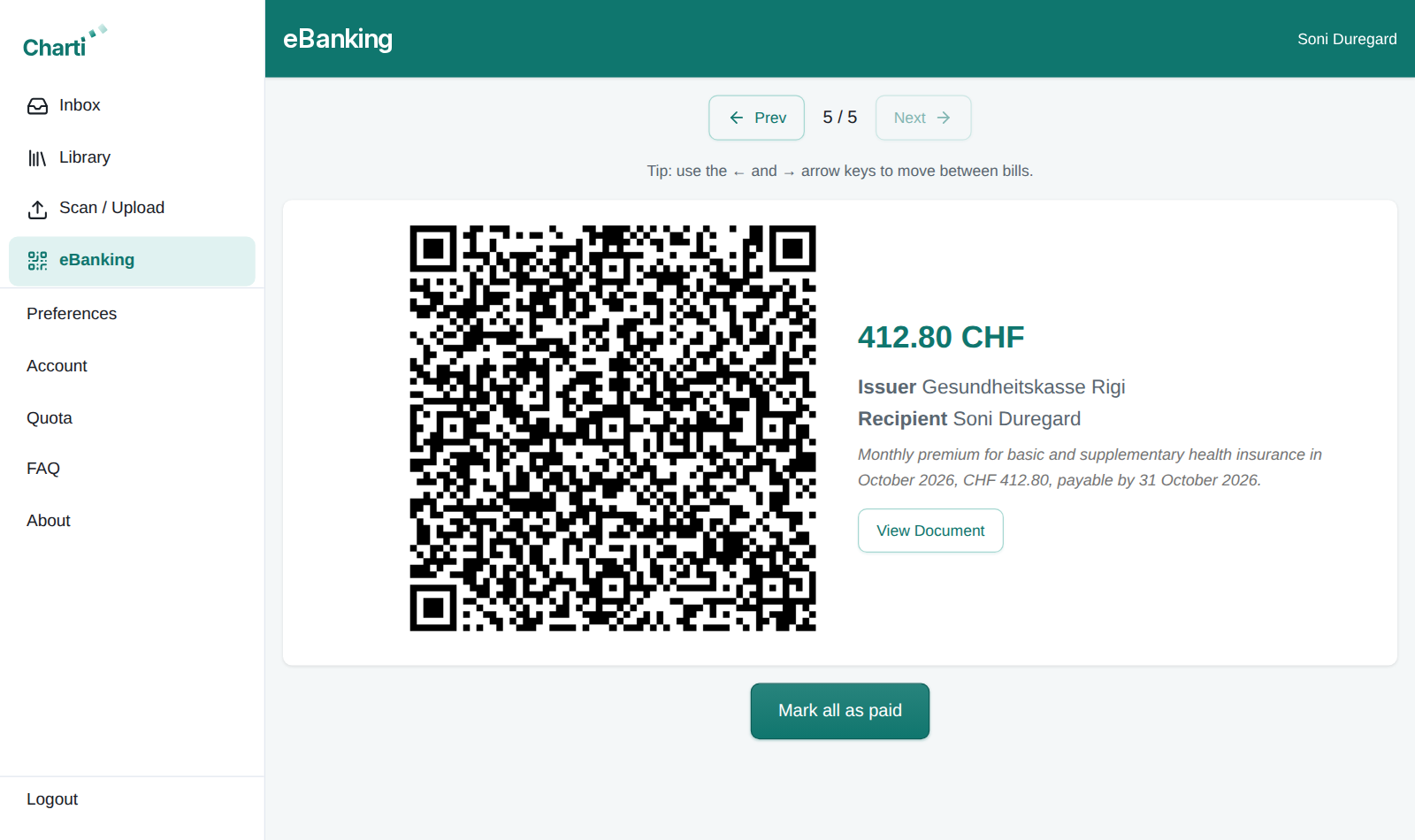
- An eBanking view presents them one by one. Each QR code is displayed large, one after the other, grouped by recipient (you, your partner, your children) then by issuer. You scan them in a row with your banking app, moving from one to the next with the keyboard arrows. A bill whose amount is left to fill in is flagged.
- Everything is marked as paid in one gesture. A recap by recipient and by tag shows you what has just been settled.
All the month’s bills, paid in about ten minutes, without forgetting one.
Frequently asked questions
Can I pay several QR bills with a single scan?
No: each QR code is one payment. But you can scan the bills one after the other, choose the date for each, then approve all the orders at once in your e-banking.
Should I pay a bill as soon as I receive it?
No. When you scan it, choose the bill’s due date as the execution date: your bank will pay at the right time, and the money stays in your account until then.
What about bills with several QR codes, such as instalments?
Each QR code corresponds to one instalment, with its own due date. Schedule each on its date, or scan them as the due dates approach. In Charti, each QR code of a bill appears separately in the eBanking view.
How do I avoid paying the same bill twice?
Mark each bill as paid right after approving the orders, and keep a single place where all bills arrive. Duplicates almost always come from a bill received twice, by post and by e-mail, or from a reminder that arrived in the meantime.
How do I pay the whole family’s bills?
Gather them in the same place, but keep visible who each bill is addressed to. In Charti, the eBanking view groups bills by recipient, then by issuer: you pay all of one person’s bills in a row.
This guide is for information only and is not legal or tax advice. If in doubt, ask your cantonal tax office or your fiduciary.