How to organise your administrative documents: a simple method that lasts
In short. Good filing comes down to four rules: a single entry point for everything that arrives, six to eight categories at most, a file name that reads by itself, and a clear-out once a year. The rest is discipline, or a tool that does it for you.
The ideal filing system is not the most detailed one: it is the one you are still using in two years. Most systems fail for the same reason: they ask for a decision on every document. Here is a method that asks for as few as possible.
Rule 1: a single entry point
Everything that arrives goes through one place before being filed:
- a “to process” tray for paper post;
- a “to process” folder in your mail for PDFs received by e-mail;
- documents from customer portals (health insurer, bank, provider), downloaded and dropped in the same place.
This is not filing yet, it is collecting. But without it, documents scatter between the kitchen table, your inbox and three portals, and no filing system can work.
Rule 2: six to eight categories, no more
Beyond eight categories, you hesitate on every document and the filing stops. These categories cover most of a household:
| Category | Examples |
|---|---|
| Tax and finances | Returns, tax assessments, bank statements, pillar 3a |
| Housing | Lease, service charge statements, electricity, household insurance |
| Health | Health insurer, medical bills, prescriptions |
| Insurance | Policies, amendments, claims |
| Work and income | Employment contracts, payslips and salary certificates, AHV, occupational pension |
| Vehicle and mobility | Vehicle registration, maintenance, travel passes |
| Family and civil status | Birth certificates, family booklet, diplomas |
| Purchases and warranties | Purchase invoices, receipts, warranty cards |
Inside each category, file by issuer, then by year: Health / Health insurer / 2026.
This order follows the way you search. You rarely look for “the papers from March 2023”,
but often for “the health insurer statements” or “everything about the flat”.
Documents to keep for life (civil status, diplomas, employment references, notarised deeds) deserve a separate folder, as paper originals.
Rule 3: a file name that reads by itself
For digital documents, adopt one convention and stick to it:
YYYY-MM-DD Issuer - Subject.pdf
For example 2026-03-15 Health insurer - Benefits statement.pdf. Putting the date first
(year, month, day) makes files sort themselves chronologically. The issuer and subject
let you recognise the document without opening it.
Scan to PDF with text recognition (OCR): most phone scanning apps do it. You can then search the content of your documents, not only their names.
Rule 4: one clear-out a year
Once a year, the best moment being just after you have filed your tax return:
- Empty the tray and the “to process” folder of whatever is still lying there.
- Gather what you need for next year’s return: you have everything to hand.
- Discard what has passed its retention period. Our guide How long to keep your bills and documents in Switzerland gives the full table. Shred anything that contains your AHV number, your IBAN or health information.
- Check your backups (see below).
Paper or digital?
Both, with different roles. Digital for almost everything: it can be searched, copied, backed up and takes no space. Paper for the only documents whose value lies in a signature or a seal. To move paper post to digital, from your phone to the Swiss Post scanning service, see How to scan your documents and post.
If you go digital, one rule matters more than all the others: the 3-2-1 rule. Keep three copies of your documents, on two different media, one of them away from home. For example your computer, an external drive and online storage. A single hard disk is an archive that can vanish in a second.
Filing that does itself
The four rules above work, but they ask for a decision on every document: which category, which issuer, which name. With Charti, artificial intelligence makes those decisions and you only check.
- A single entry point, automatically. Forward your documents to your personal @charti.ch address, or upload paper post once scanned. Unreadable documents go through text recognition.
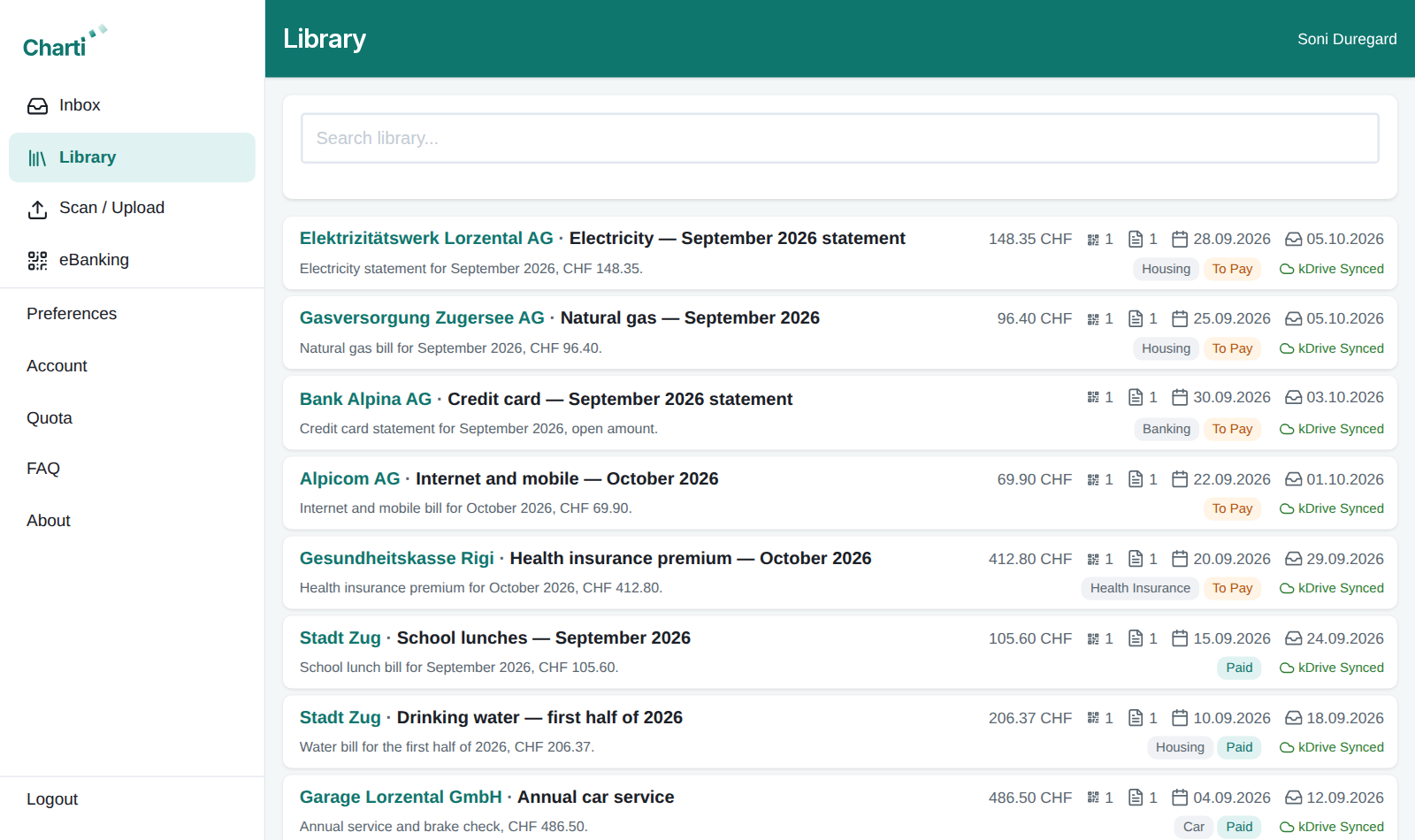
- Each document is read and filed. Charti recognises the document type (bill, statement, contract, insurance policy, payslip…), the issuer, the recipient (you, your spouse, your children) and the industry, then writes a summary. If you correct a filing, Charti remembers it for the next documents from the same issuer.
- A clear name and folder, on your computer. Each validated document is filed by
issuer, year and month, for example
Health insurer / 2026 / 03 - Benefits statement.pdf, and synced to your computer. These are real files, which you can open, back up and keep, even without Charti. - Everything can be found by its content. Search covers the full text of documents: no need to remember where you put them.
Frequently asked questions
Should I keep the paper originals once scanned?
For most documents, no: a scanned bill, statement or breakdown is enough in practice. Do keep the original of anything whose value lies in a signature or a seal: will, notarised deeds, important contracts, diplomas, civil-status records.
How many categories should I have?
Between six and eight. Beyond that you hesitate on every document and the filing stops. Tax and finances, housing, health, insurance, work, vehicle, family and civil status, purchases and warranties cover most of a household.
Should I file by date or by topic?
By topic first, then by issuer and by year. You rarely look for “the papers from March 2023”, but often for “the health insurer statements” or “everything about the flat”.
What format should I scan documents in?
PDF, with text recognition (OCR), so you can search the content. A resolution of 300 dpi is enough for readable documents and light files.
Where can I store digital documents safely?
Follow the 3-2-1 rule: three copies, on two different media, one of them away from home. For example your computer, an external drive and online storage, preferably hosted in Switzerland for documents this personal.
This guide is for information only and is not legal or tax advice. If in doubt, ask your cantonal tax office or your fiduciary.